Grav WebSite Design

Website Strategy
The site was developed to be non indexed, non followed and not visible on the internet. However nothing on the site is GDPA or personal information. It is information available to all club members but not intended to be publically available. That is what the Clubs public website is used for.
Why is it like this
We are a private members club co-operative for the purposes of selling tickets to events that cannot legally be sold to the public. The Club has commercially sensitive information that it need to make available to members so that they can make informed decisions that should not be made available to the public and our competitors.
Members Information Hub – System Overview
Purpose
This page explains how the Members Hub website is structured and how its main components work together.
It is intended to:
- Help future volunteers understand the system quickly
- Provide a reference point for ongoing development
- Reduce reliance on individual knowledge or past conversations
This is not technical documentation.
It is a working map of how the site fits together.
1. Core Structure
The Members Hub is built using Grav CMS.
It uses a child theme:
- Parent theme: Learn2
- Custom theme: Members Hub
The custom theme overrides and extends Learn2 where required.
Key principle:
If a file exists in Members Hub → it is used
Otherwise → Grav falls back to Learn2
2. Two Page Types (Important)
The site operates using two distinct page systems.
Standard Members Pages
Used for:
- Members content
- Governance pages
- Operations pages
- General information
Features:
- Sidebar navigation
- Search
- Page feedback (👍 😐 👎)
- Optional comments (consultation pages only by default but ca be switched on in other pages)
Service Landing Pages
Used for:
- Join the Club (MemberMojo)
- Snooker Booking ( CueBooking)
- Club Entertainment (Elf Sights)
- Club Calendar (Google)
- email subscriptions (Mailerlite)
- External services and embeds (Youtube and others)
Features:
- No sidebar
- Clean standalone layout
- Return button logic (Go back to public or private website)
- Supports:
- Embedded pages (iframe)
- External links
- Widgets (e.g. Elfsight)
- Custom HTML blocks
These pages are designed to be:
- Shareable
- Public-facing
- Simple to use
3. How Pages Are Built
Standard Pages
Structure:
base.html.twig
↓
default.html.twig
↓
partials (content, footer, sidebar, feedback, etc.)
Flow:
- Base layout loads (header, sidebar, scripts)
- Page content is inserted
- Optional features are added:
- Page feedback
- Comments (consultations only)
- Footer is rendered
Service Pages
Structure:
base-service.html.twig
↓
service-landing.html.twig
Flow:
- Service layout loads (no sidebar)
- Page type is read from frontmatter
- Content is rendered based on type:
- Embed
- Link
- Widget
- Message
- HTML block
- Return button is generated safely
- Club-branded footer is shown
4. Reusable Components (Partials)
The site uses reusable building blocks called partials.
Key partials include:
- Footer
- Sidebar
- Logo
- Page attribution
- Page feedback (prompt + results)
- Search box
- Comment form
These ensure consistency across the site.
5. Page Feedback & Comments
Page Feedback
- 👍 Up
- 😐 Neutral
- 👎 Down
Used on:
- Consultation pages (default ON)
- Other pages (optional via frontmatter)
Displayed:
- At top (prompt)
- At bottom (results)
Comments
Used only for:
/operations/consultations/governance/consultations
Conditions:
- Must not be turned off in frontmatter
- Moderated before display
6. Editor Page Types (Blueprints)
The Admin interface provides structured page types:
- Default page
- Embed page
- HTML embed page
- Widget page
This ensures:
- Consistency
- Simpler editing for volunteers
- Reduced risk of errors
7. Assets (Styling & Behaviour)
Custom assets are minimal and focused:
css/custom.css→ layout and stylingjs/cc-reset-tree.js→ sidebar/navigation behaviour- Club crest image for branding
Most styling comes from Learn2, with targeted overrides.
8. Key Design Principles
The system has evolved with the following principles:
1. Separation of concerns
- Structure = folders
- Layout = templates
- Logic = Twig + plugins
2. Simplicity for users
- Clear navigation
- Minimal friction
- Consistent layouts
3. Flexibility for editors
- Page types via blueprints
- Frontmatter controls behaviour
4. Controlled complexity
- Two page systems only (not many)
- Reusable components
9. Where to Start (For Future Work)
If changes are required, start here:
Core files
templates/base.html.twigtemplates/default.html.twigtemplates/service-landing.html.twig
Key partials
partials/footer.html.twigpartials/sidebar.html.twig
Styling
css/custom.css
10. Final Note
This system was developed iteratively.
It is:
- Functional
- Structured
- Extendable
It does not require complete understanding to work with.
If in doubt:
- Make small changes
- Test locally
- Keep this page updated
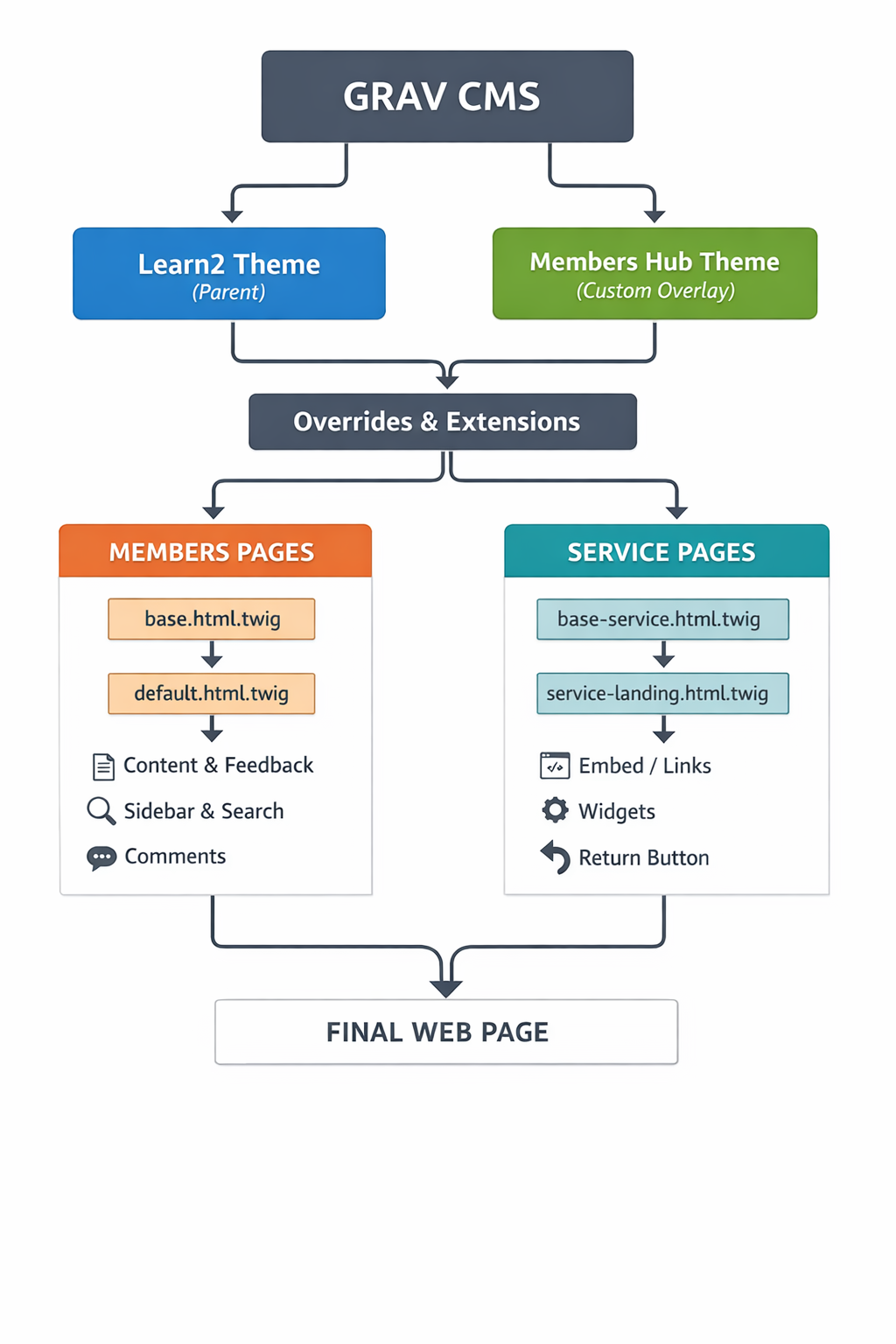
🧠 What this shows (in plain English)
- Grav loads your theme
- Your theme sits on top of Learn2
- Then splits into:
- Members pages (with sidebar, feedback, etc.)
- Service pages (clean, standalone, public-facing)
- Both paths produce the final page
🧠 What this shows (in plain English)
- Grav loads your theme
- Your theme sits on top of Learn2
- Then splits into:
- Members pages (with sidebar, feedback, etc.)
- Service pages (clean, standalone, public-facing)
- Both paths produce the final page
System Diagram
Comments